No file uploads

ID photo / print sheet

1. Select images2. Check preview and settings3. Process and save the result

Size / framing / background / print copies

Examples and limitations

ID photo / print sheet

ID photo / print sheet — Size / framing / background / print copies

Choose a photo, adjust the framing, then create your files.

  1. Select images
  2. Check preview and settings
  3. Process and save the result

Usage example

Example input
portrait.jpg
Print sheet size
A4 (210 × 297 mm)
photo width (mm)
35
Expected result
PNG · 413×531 px + A4 PDF · 6 copies

Examples are illustrative. Actual results depend on the source file and settings.

Guides and examples
Examples and limitations

Size / framing / background / print copies

Before and after, tested with real files

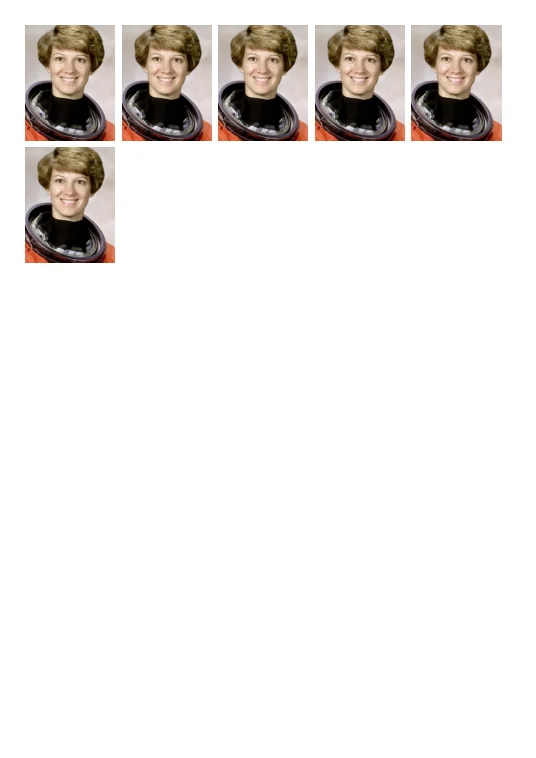
Placing six 35 × 45 mm photos on one A4 sheet
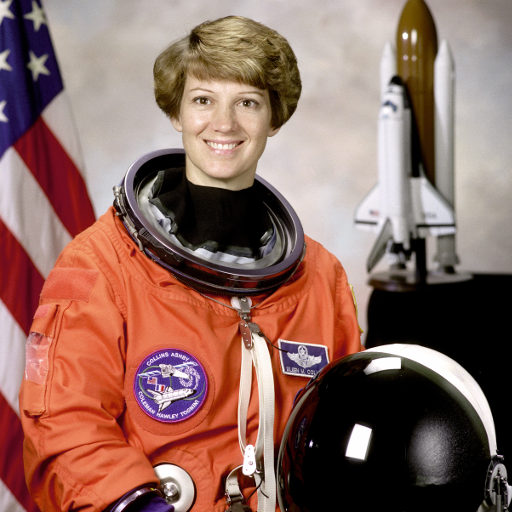
Before · Placing six 35 × 45 mm photos on one A4 sheet
Before · 512 × 512 px
Save source sample
After · Placing six 35 × 45 mm photos on one A4 sheet
After · 35 × 45 mm × 6 · A4
Save result sample

35 × 45 mm × 6 · A4 210 × 297 mm · 300 dpi

The dimensions inside the PDF were checked. Physical printer accuracy and passport/visa compliance were not tested. PNG pixels are rounded; PDF placement uses the specified millimetres.

  • Choose the sample portrait and select A4 paper.
  • Set 35 mm width, 45 mm height and 6 copies. This example uses 200% zoom, 44% horizontal and 30% vertical center.
  • Save the PDF and print on A4 at Actual size (100%). Disable fit/shrink and check the print with a ruler.

Measured on these samples. Content, settings and browser affect the result. Previews are scaled down. Verified · 2026-10-18

Photo source: NASA / Eileen Collins · public domain · This photo demonstrates layout, not official ID-photo compliance. No NASA endorsement or affiliation.

Input and output

Supported input
image/*
Saved output
PNG · PDF [300 dpi]

Usage example

Example input
portrait.jpg
Print sheet size
A4 (210 × 297 mm)
photo width (mm)
35
photo height (mm)
45
Photo copies
6
Expected result
PNG · 413×531 px + A4 PDF · 6 copies

Examples are illustrative. Actual results depend on the source file and settings.

Limits and checks

  • Choose a photo, adjust the framing, then create your files.
  • Print the PDF at Actual size / 100%. Disable Fit to page and borderless expansion.
  • Cut to the specified size and location. We do not determine whether you meet the official ID photo requirements. Save photo PNG and 300 dpi photo paper PDF.

Guides & site information

Image formats and editing

Choose files and an output format. JPG suits photos; PNG and WebP support transparency. JPG and WebP are lossy; PNG metadata preservation is not guaranteed. Crop coordinates refer to original pixels. Review the before/after comparison.

Media processing and size estimates

Preserve mode copies codecs into compatible containers. Compatible conversion, accurate cuts and audio effects re-encode. Fast cuts may shift at keyframes or packets. Size estimates are approximate; content-dependent video, FLAC, images and documents have no reliable advance estimate.

HWP and PDF support

HWP 5.x and HWPX are supported. By default, missing original fonts block PDF conversion. HWP PDF output is a 192 dpi image PDF without searchable text. Existing PDF editing copies pages but does not preserve bookmarks, signatures, attachments or interactive forms. Image PDFs embed image pixels.

Privacy information

Selected files and connected fonts are processed on your device, without uploading them to a server. Settings, language and temporary work data are stored in the browser and can be removed by clearing site data. Conversion engines and automatic-caption models are downloaded. See the privacy and advertising/cookie pages for connection and cookie information about external services and the Coupang banner shown on South Korean connections.

Archive tools write large results to temporary storage on your device. Originals are never uploaded. Clear results or select new files to remove temporary outputs. Interrupted tabs may leave data; abandoned jobs older than a day are cleaned during subsequent use. Clear this Site’s browser storage to remove it immediately.

Troubleshooting and contact

For errors, privacy, and copyright inquiries, please send them to admin@infohubs.net. Provide the tool name, error message, and browser information, but exclude file names, file contents, and personal information.

FIND YOUR FORMAT

Find your format

Outputs: 7 image, 6 video and 9 audio formats, plus PDF/HWP/HWPX documents. Document conversion inputs are HWP 5.x and HWPX. HEIC, AVIF and SVG are image inputs only. Animated or multipage images use the first frame. Codec support varies. RAW, PSD and DRM are unsupported.

Your files stay on your device.

Processing happens in your browser. Files are neither uploaded nor stored on a server.
Engines download on first use. The document engine is about 12 MB.

PRIVATE
BY DESIGN.
A LITTLE HELP

Questions?

A few things to know before you start.

Can I convert HWP, Word and PDF documents?

Convert HWP 5.x/HWPX to PDF and between HWP/HWPX. Font checks, page previews and content-loss checks apply. PDF output is rasterized at 192 dpi, with no searchable/selectable text. Exact layout fidelity is not guaranteed. HWP conversion does not accept Word, DOCX or PDF input. Use PDF page editing to merge, extract, rotate or delete pages of existing PDFs.

Are settings or recent tool records saved?

Favorites, recently used tool IDs, language and explicitly saved settings are kept in this browser. Selected file contents and entered document text are not stored. Large archive results may remain in device temporary storage; clear results in the archive tool to remove them.

How do I convert a file?

Choose a task from All tools and add files. Review settings and limits, then start processing. Download completed files individually or as a ZIP.

Are there file size or count limits?

The main converter accepts up to 20 files / 200 MB total: images 30 MB, video 150 MB, audio 100 MB, documents 10 MB / 100 pages each. Separate archive, HEX, photo and PDF tools follow the limits shown on their own screens. Start with small jobs on a desktop for large files.

Do you support every media format?

Common formats are supported, but not every format. HEIC is input-only. AVIF needs browser decoding support. SVG can be rasterized; bitmap-to-vector conversion is not provided. Camera RAW, PSD, DRM and some special codecs are unsupported.

Can I crop and resize an image?

Choose Crop & resize. Drag an area or enter X/Y/width/height in original pixels. Enter both output dimensions for an exact canvas, or one to calculate the other proportionally. Keep aspect ratio adds transparent padding for PNG/WebP or the chosen background for JPG/BMP. Crops are individual per image. Upscaling does not restore detail.

Can I trim videos at specific times?

Choose Trim a video and enter decimal start/end seconds. Leave the end blank for the remainder. Fast cuts preserve codecs but may shift to keyframes. Accurate cuts re-encode at frame boundaries, consuming more CPU/battery and potentially changing quality. Originals are unchanged. The 150 MB limit applies to the full input regardless of cut length.

Why does video conversion take time?

Video is processed on your device. On first use, the engine is downloaded; its decompressed size is about 32 MB. Higher resolutions take longer; lowering resolution reduces work. Short clips are recommended on mobile.

Will my original file or quality change?

Original files are unchanged. Same format and default settings can return the original bytes. Media defaults to copying codecs when compatible. Opting into re-encoding may change quality and tracks. Image format changes may alter metadata, transparency, frames and colors. Review notices first. A lossless output cannot recover quality already lost.